Upload a file
Portaim accepts CSV, XLSX and XLS files up to 50 MB, or a link on Google Drive, Google Sheets, Dropbox or a public URL, in any column layout and language, with your choice of sheet and header row.
Upload from your computer
On the dashboard, click Upload File and choose a CSV, XLSX or XLS file, or drop it onto the dialog. The limits are 50 MB, 100,000 rows and 100 columns; the exact list of accepted formats and encodings is in Files and links. In the trial on portaim.com, a file can be up to 10 MB and the first 1,000 rows are processed; the rest are cut with a notice.
Portaim checks the file’s structure before reading it. A file with merged cells, a password, several tables on one sheet, or almost no data is rejected with a message that says why. A file whose rows have inconsistent column counts gets a warning you can proceed past, unless most of the rows differ.
Pick the sheet and the header row
If the workbook has more than one sheet, Portaim selects the first one that passes the structural checks (a cover or notes page with one column, merged cells, only a few filled cells or several tables does not) and lets you choose another. A sheet that fails those checks is refused when you click Continue, with the reason, so you can pick a different one. The header row starts at row 1. If the first rows look like a title block (a company name, a list title, empty rows) and the column names sit lower down, Portaim says so and offers a button to use that row. The preview shows the first rows; click a row number to use that row as the header instead.
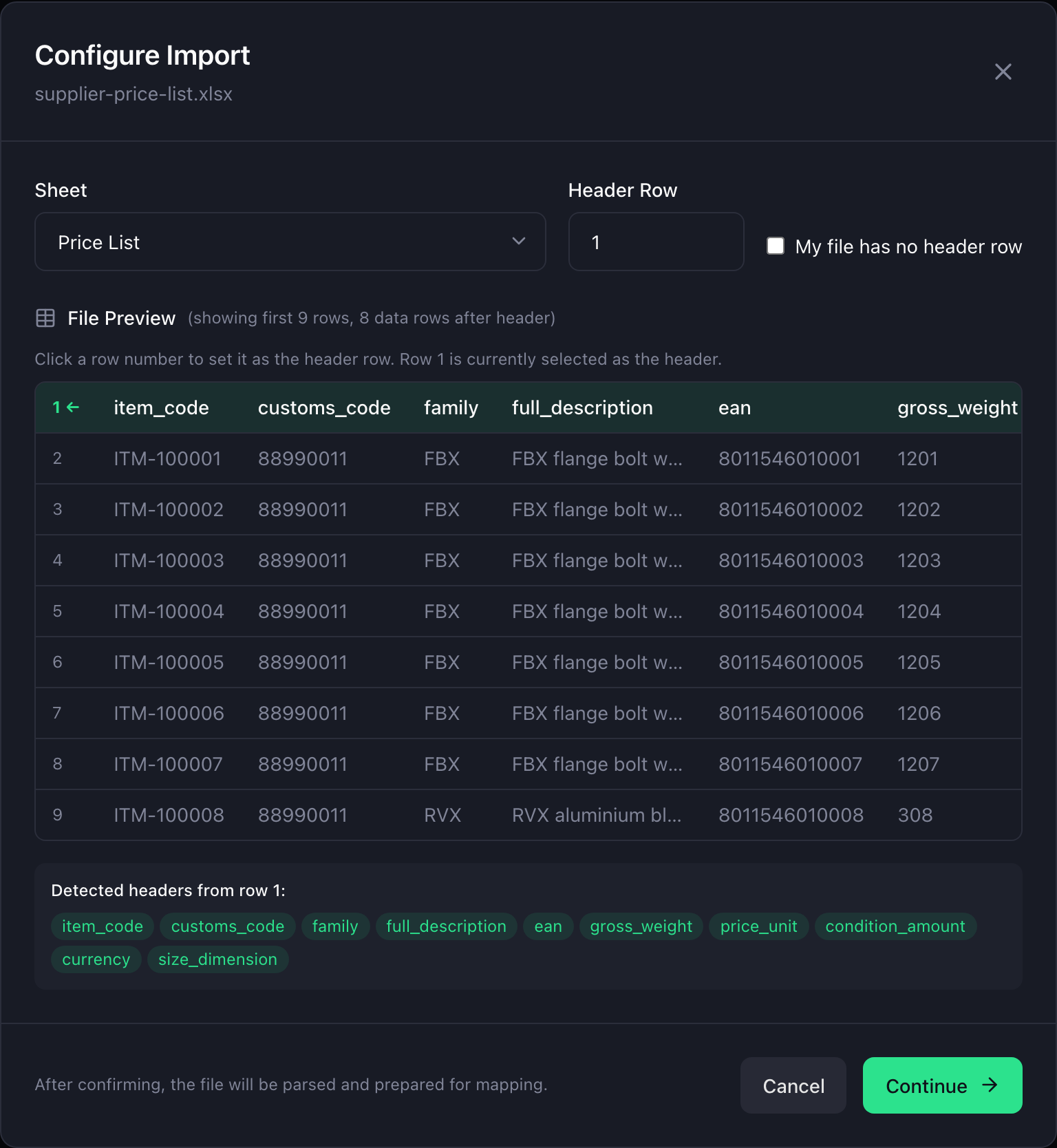
My file has no header row. Some supplier exports start straight with data. Tick the box and Portaim names the columns Column 1, Column 2, and so on, and keeps the first row as a product. The mapping step still works: it reads the values, not the headers.
Import from a link
Open the menu next to Upload File and choose From a link. Paste one of:
| Link | What Portaim does |
|---|---|
| Google Drive share link | Downloads the file. The share setting must be “Anyone with the link”. |
| Google Sheets link | Fetches the whole workbook, so a multi-tab sheet goes through the same sheet picker. “Anyone with the link” is required. |
| Dropbox link | Turns the preview page into a direct download. The link must be shared for public download. |
| Any public URL ending in a file | Downloads it. The URL must return the file itself, not a login or preview page. |
The download has 30 seconds to complete and the same 50 MB cap as an upload. When a link returns a web page instead of a file, Portaim says which sharing setting to change.
Any column layout, any language
A supplier file does not need to look like Shopify’s template. Columns can carry any header in any order, variants can sit on separate rows or in one combined column, and images can be spread across several columns; the next step, Map columns, works that out from the headers and the values. Headers and values in German, French, Spanish, Italian, Polish and other languages are detected and mapped like English ones, and the language decides which edition of Shopify’s product taxonomy categories are matched against.
Files that are already in a store’s format
Two kinds of file skip the guessing and are recognised on upload:
- Shopify-format files, such as an export from another store or a filled-in copy of Shopify’s product template, are mapped column for column by a fixed preset; what the Fix step then checks on such a file has its own guide. Shopify columns Portaim has no field for are ignored.
- WooCommerce exports (Products, then Export) are converted to Shopify’s layout while the file is read: variations become variants, attributes become options, categories become tags and a product type. The mapping step shows a conversion card with what changed, and Use the original file instead discards the conversion. The column-by-column rules are in WooCommerce conversion.
A file larger than your remaining rows
The free plan processes 1,500 rows a month. If a file has more rows than you have left, Portaim does not reject it: it imports the rows that fit and shows how many were processed and how many were skipped, as a banner on the mapping page and a chip in your imports list. If the whole monthly allowance is used, the import stops with a message saying the limit resets at the start of next month. Details: Account and settings.
What to do next
The file is parsed and the mapping is already running. Continue with Map columns.
Related
- Files and links
- WooCommerce conversion
- Migrate WooCommerce Products to Shopify from a CSV Export Migrate products from WooCommerce to Shopify by uploading its built-in CSV export: variations become variants, attributes become options, categories become tags.