WooCommerce conversion
What Portaim does with a WooCommerce product export, column by column, when it converts the file to Shopify's layout on upload, and what does not carry over.
What is recognised
The CSV produced by WooCommerce’s built-in exporter (Products, then Export), with any column selection, in English. A file is treated as a WooCommerce export when it has the columns Type, SKU, Name, Published and Regular price, plus at least two more that only WooCommerce writes, such as Visibility in catalog, In stock?, Tax status, Parent or Attribute 1 name.
Not recognised: exports from third-party plugins (WP All Export, Store Exporter Deluxe) and exports with translated headers. Those files still import; they go through the ordinary mapping step like any supplier file. A WordPress XML export is not one of the accepted file types.
The conversion is deterministic. The same file always produces the same result, and the uploaded file itself is never modified.
Row types
| WooCommerce type | Result |
|---|---|
simple | One product with one default variant. |
variable | The product shell: title, description, vendor, type, tags, status and gallery. Its own price is ignored; its SKU links the variations and can supply the handle, and its stock is used only where a variation’s Stock says parent. |
variation | One variant of its parent: options, SKU, price, stock, weight, tax, shipping and its own image. |
variable with no variations in the file | Skipped, with a notice. |
grouped | Skipped. The member products are ordinary rows and import on their own. |
external | Skipped. |
virtual flag | Variant does not require shipping. |
downloadable flag | Product imports; the download files do not. |
Variations are linked to their parent by the Parent column (id:123 or a SKU). When the column is missing or its cell is blank, a variation attaches to the nearest variable row above it, which is how WooCommerce writes the file.
Handle
WooCommerce’s export has no URL slug, so the handle is made from a Slug column when one exists, else from the product name, else from the SKU: lowercase, ASCII, hyphens, cut at 255 characters. Two different products that produce the same handle get -2, -3 appended; products are never merged because they share a name. Original WooCommerce URLs are not preserved unless a slug column is present.
Options
Attributes become options only when they vary between a product’s variations:
- an attribute with the same value on every variation becomes a tag (
Material: Cotton), not an option; - attributes listed on the parent but used by no variation become tags too;
- a variation without a value for an axis gets the parent’s default, else the first value listed;
- more than three varying attributes: the first two stay as Option 1 and 2, the rest are combined into Option 3 (
Degree, Color=20°, Black), so every variant stays purchasable; - an option name containing
/is rewritten with,, because Shopify’s importer rejects it.
Two variations with the same option values are both kept and flagged in the Fix step, where you resolve them.
Column by column
Product fields
| WooCommerce | Shopify | Rule |
|---|---|---|
Name | Title | Trimmed. |
Short description + Description | Body (HTML) | Short description first. WordPress block markers and shortcodes are removed; the rest of the HTML passes through. |
Brands | Vendor | First brand listed. |
Categories | Type | The last segment of the first category: Home > Audio → Audio. |
Categories | Tags | Every segment of every category. |
Tags | Tags | Appended after the category tags. |
Published, Visibility in catalog | Status, Published | 1 or true → active and published. 0, -1, 2 → draft and unpublished. hidden visibility → unpublished. |
Images | Image Src, Image Position | In the listed order, duplicates removed, up to 250. |
Variant fields
| WooCommerce | Shopify | Rule |
|---|---|---|
SKU | Variant SKU | Trimmed; may be empty. |
Regular price, Sale price + sale dates | Variant Price, Compare At Price | An active sale: price = sale, compare-at = regular. No sale or an expired one: price = regular. Sales scheduled for the future are ignored, with a notice. |
Stock, In stock?, Backorders allowed? | Inventory Tracker, Qty, Policy | A numeric stock is tracked; blank stock stays untracked. Backorders allowed → policy continue. |
Tax status | Variant Taxable | taxable → true; none, shipping → false. |
Weight (kg) and similar | Variant Grams, Weight Unit | Converted to grams; the unit is read from the header. |
Type flag virtual | Requires Shipping | false. |
Images on a variation | Variant Image | The first URL. |
Not carried over
ID, Is featured?, Position, Sold individually?, Low stock amount, Allow customer reviews?, Purchase note, Shipping class, Tax class, dimensions, upsells and cross-sells, grouped products, external URL and button text, download settings, Attribute N visible and global, and every Meta: column including SEO plugin fields. Product category (Shopify’s taxonomy), SEO title and description, barcodes and cost are not produced because WooCommerce’s export has no matching columns; map or add them in Portaim if you need them.
Inside Portaim
- The row quota is charged on the rows in the uploaded file, not the converted rows.
- The converted columns are Shopify’s own, so they are mapped one to one by the Shopify preset, with no model involved. A saved mapping for the same layout takes precedence.
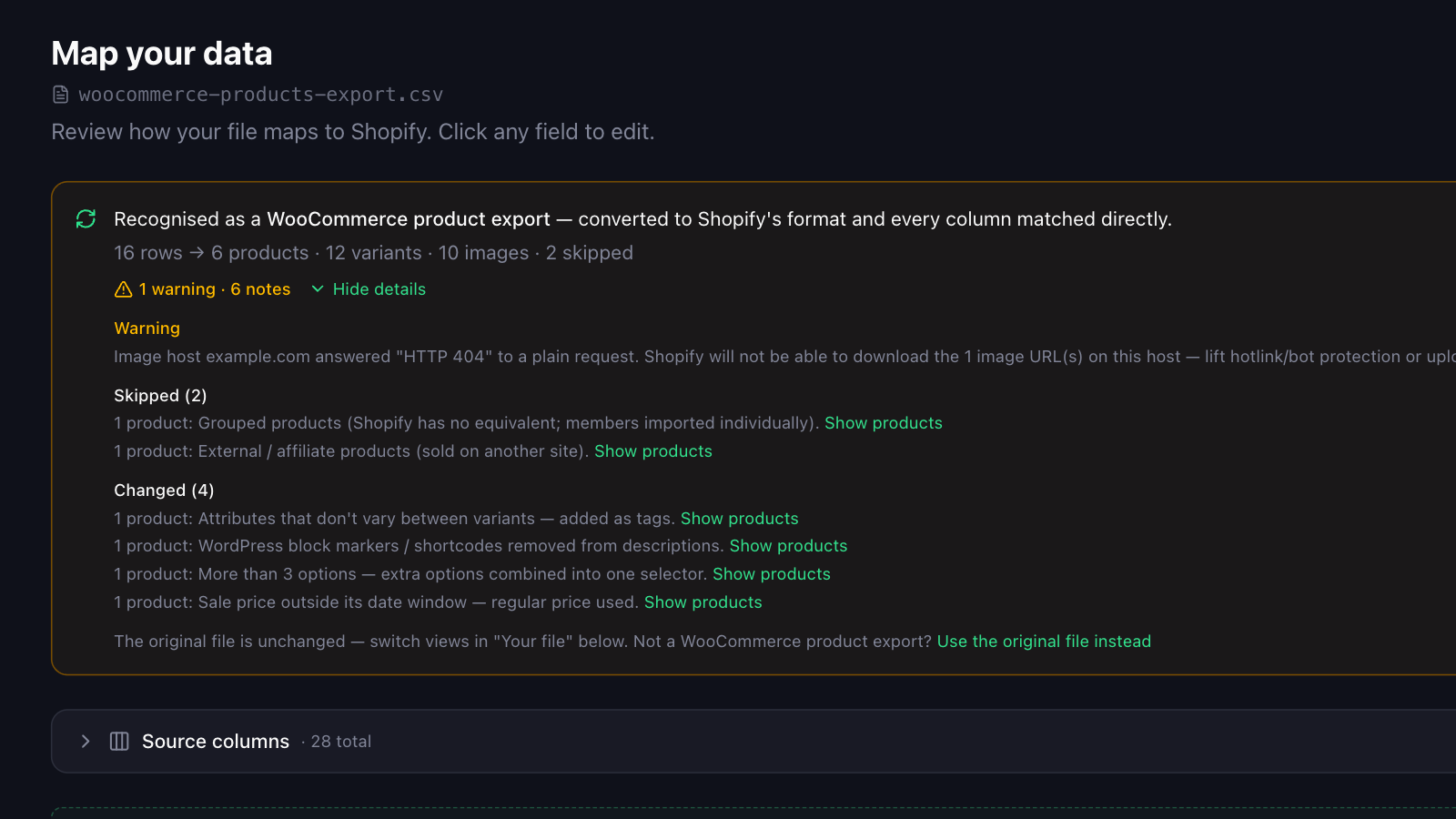
- One image host at a time is probed with a plain request. A host that answers with an error, typically a 403 from hotlink protection, produces a warning, because Shopify would fail to download every image from it while reporting the import as successful.
- The conversion card on the mapping page lists what was skipped, changed and left for the Fix step, grouped by what the converter did, with the affected products under each. Use the original file instead discards the conversion.
Caution Images are not re-hosted. Shopify downloads them from your WordPress site at import time, so the site must stay online and must serve files to non-browser requests until the import is done.
Related
- Migrate WooCommerce Products to Shopify from a CSV Export Migrate products from WooCommerce to Shopify by uploading its built-in CSV export: variations become variants, attributes become options, categories become tags.
- Upload a file